Puzzle 7: 2D Blocks
Overview
Implement a kernel that adds 10 to each position of 2D TileTensor a and stores
it in 2D TileTensor output.
Note:
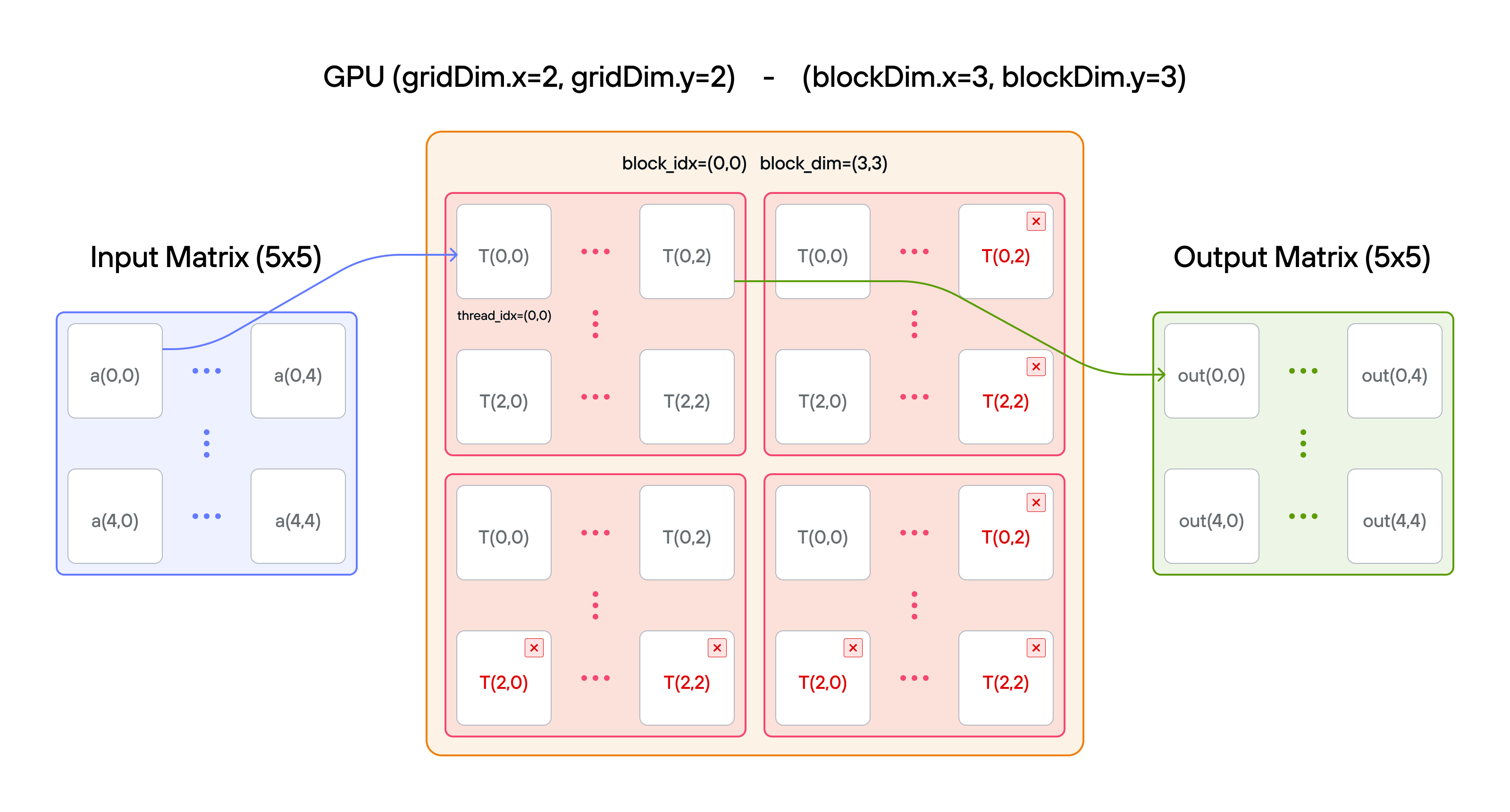
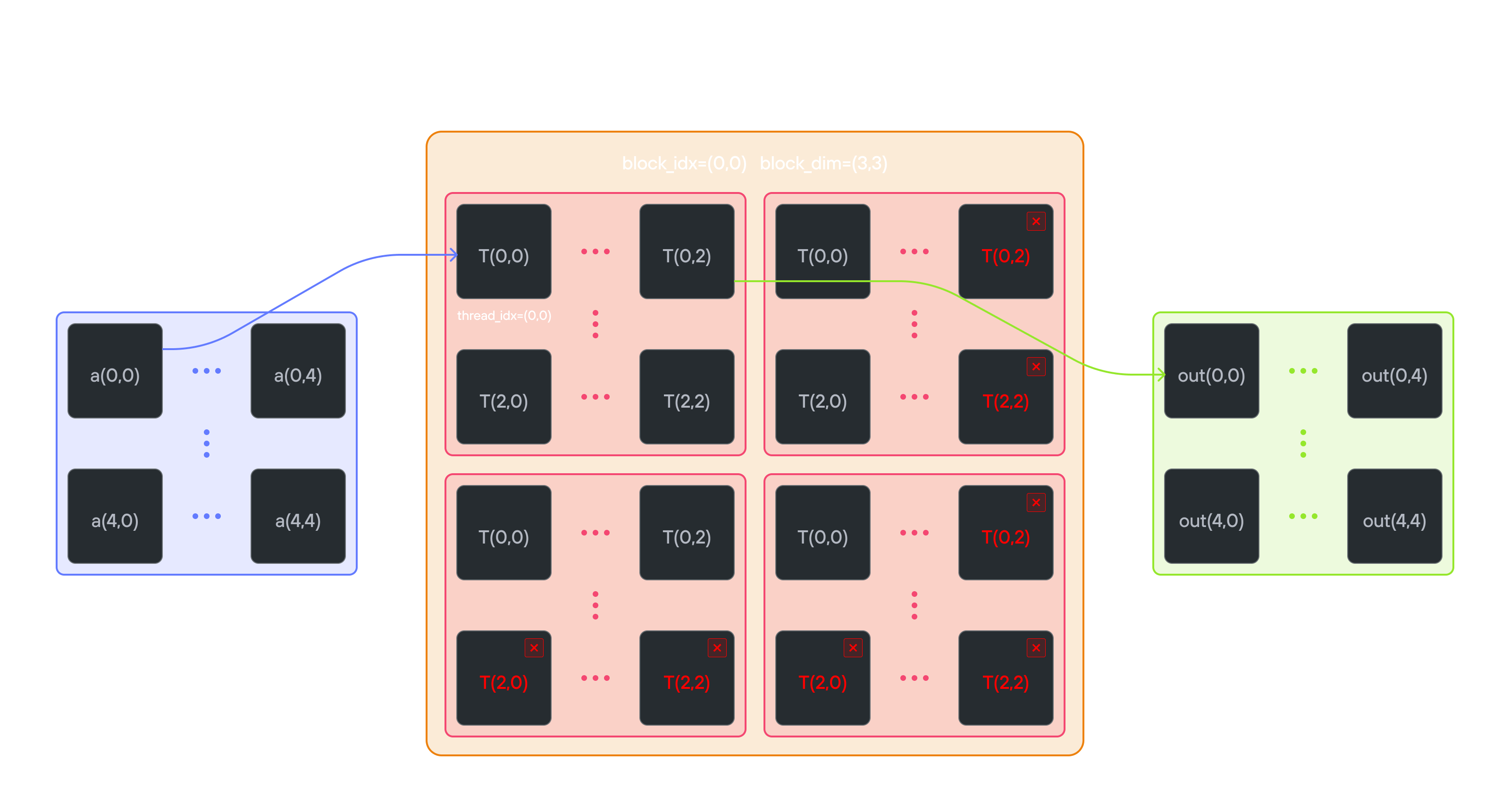
You have fewer threads per block than the size of a in both directions.
Key concepts
In this puzzle, you’ll learn about:
- Using
TileTensorwith multiple blocks - Handling large matrices with 2D block organization
- Combining block indexing with
TileTensoraccess
The key insight is that TileTensor simplifies 2D indexing while still
requiring proper block coordination for large matrices.
🔑 2D thread indexing convention
We extend the block-based indexing from puzzle 6 to 2D:
Global position calculation:
row = block_dim.y * block_idx.y + thread_idx.y
col = block_dim.x * block_idx.x + thread_idx.x
For example, with 2×2 thread blocks covering a 4×4 matrix:
Block (0,0):   Block (1,0):
[0,0  0,1]     [0,2  0,3]
[1,0  1,1]     [1,2  1,3]

Block (0,1):   Block (1,1):
[2,0  2,1]     [2,2  2,3]
[3,0  3,1]     [3,2  3,3]
Each position shows (row, col) for that thread’s global index. The block dimensions and indices work together to ensure:
- Continuous coverage of the 2D space
- No overlap between blocks
- Efficient memory access patterns
Configuration
- Matrix size: \(5 \times 5\) elements
- Layout handling:
TileTensormanages row-major organization - Block coordination: Multiple blocks cover the full matrix
- 2D indexing: Natural \((i,j)\) access with bounds checking
- Total threads: \(36\) for \(25\) elements
- Thread mapping: Each thread processes one matrix element
Code to complete
comptime SIZE = 5
comptime BLOCKS_PER_GRID = (2, 2)
comptime THREADS_PER_BLOCK = (3, 3)
comptime dtype = DType.float32
comptime out_layout = row_major[SIZE, SIZE]()
comptime a_layout = row_major[SIZE, SIZE]()
comptime OutLayout = type_of(out_layout)
comptime ALayout = type_of(a_layout)


def add_10_blocks_2d[
    Engine: TensorEngine,
](
    output: TileTensor[mut=True, dtype, OutLayout, MutAnyOrigin, Engine=Engine],
    a: TileTensor[mut=False, dtype, ALayout, ImmutAnyOrigin, Engine=Engine],
    size_dev: Int32,
) where (Engine.element_size == 1):
    var size = Int(size_dev)
    var row = block_dim.y * block_idx.y + thread_idx.y
    var col = block_dim.x * block_idx.x + thread_idx.x
    # FILL ME IN (roughly 2 lines)
View full file: problems/p07/p07.mojo
Tips
- Calculate global indices:
row = block_dim.y * block_idx.y + thread_idx.y,col = block_dim.x * block_idx.x + thread_idx.x - Add guard:
if row < size and col < size - Inside guard: think about how to add 10 to 2D TileTensor
Running the code
To test your solution, run the following command in your terminal:
pixi run p07
pixi run -e amd p07
pixi run -e apple p07
uv run poe p07
If the puzzle isn’t solved yet, out prints as an all-zero \(5 \times 5\)
grid while expected holds 10.0 through 34.0. Both are wrapped in a
TileTensor before printing, so they render as a two-dimensional grid rather
than as a flat buffer.
Solution
def add_10_blocks_2d[
    Engine: TensorEngine,
](
    output: TileTensor[mut=True, dtype, OutLayout, MutAnyOrigin, Engine=Engine],
    a: TileTensor[mut=False, dtype, ALayout, ImmutAnyOrigin, Engine=Engine],
    size_dev: Int32,
) where (Engine.element_size == 1):
    var size = Int(size_dev)
    var row = block_dim.y * block_idx.y + thread_idx.y
    var col = block_dim.x * block_idx.x + thread_idx.x
    if row < size and col < size:
        output[row, col] = a[row, col] + 10.0
This solution demonstrates how TileTensor simplifies 2D block-based processing:
-
2D thread indexing
-
Global row:
block_dim.y * block_idx.y + thread_idx.y -
Global col:
block_dim.x * block_idx.x + thread_idx.x -
Maps thread grid to tensor elements:
5×5 tensor with 3×3 blocks:

Block (0,0)         Block (1,0)
[(0,0) (0,1) (0,2)] [(0,3) (0,4)    *  ]
[(1,0) (1,1) (1,2)] [(1,3) (1,4)    *  ]
[(2,0) (2,1) (2,2)] [(2,3) (2,4)    *  ]

Block (0,1)         Block (1,1)
[(3,0) (3,1) (3,2)] [(3,3) (3,4)    *  ]
[(4,0) (4,1) (4,2)] [(4,3) (4,4)    *  ]
[  *     *     *  ] [  *     *      *  ]
(* = thread exists but outside tensor bounds)
-
-
TileTensor benefits
-
Natural 2D indexing:
tensor[row, col]instead of manual offset calculation -
The row-major layout travels with the tensor, so the offset arithmetic stays out of the kernel
-
Example access pattern:
Raw memory:         TileTensor:
row * size + col    tensor[row, col]
(2,1) -> 11        (2,1) -> same element
-
-
Bounds checking
- The grid launches 36 threads (2×2 blocks of 3×3) for 25 elements
- Guard
row < size and col < sizeswitches off the 11 threads that land outside the tensor - Without the guard, those threads would read and write past the end of the buffer—the exact bug puzzle 10 hunts down
-
Block coordination
- Each 3×3 block covers one tile of the 5×5 tensor
- The block indices decide which tile a block touches; the guard decides which of its threads do any work
TileTensormaps(row, col)to a flat offset the same way from every block, so no block needs to know where its tile starts
This pattern shows how TileTensor simplifies 2D block processing while keeping thread coordination explicit.